Communication Is a Gift

Communication Is a Gift

Communication Is a Gift

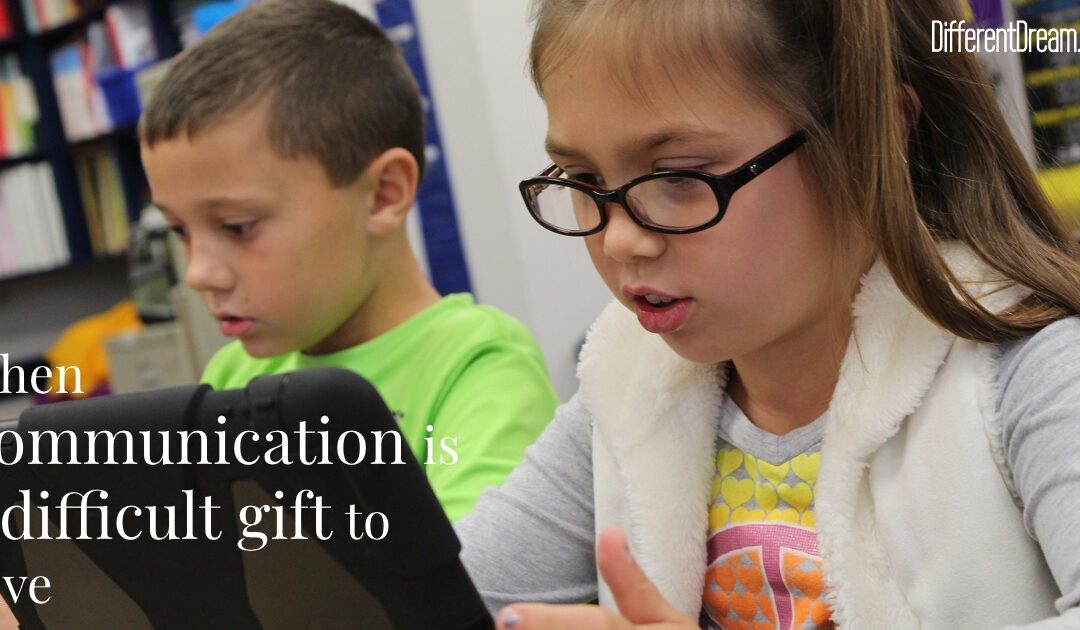
Communication is a gift for a child who is non-verbal or has delayed speech. Our youngest daughter, Ellie, recently started using a communication device at school. We felt a sense of dread as the words ā€œcommunication boardā€ and ā€œiPadā€ came home.

You see, our family, including extended family, took sign language classes when our oldest daughter, Abbey, was 3. I also taught myself using signing videos and other things to give her a mode of communication.Ā 

She loved to attempt to sign. Ā 

She attended our local preschool disabled program, and it was clear that her verbal skills would not progress. She needed to be immersed in the world of sign language if it was going to sink in. When she was 5, she moved to a school for the hearing impaired. When she was 9, that school decided it was no longer the right fit for her given her extensive physical needs. She transitioned to a school for the severely or multiply handicapped. That school decided sign language was not appropriate for her because her cerebral palsy made it hard for her to properly sign.Ā 

They suggested an iPad.Ā 

The iPad went back and forth from home to school for years.Ā  While Abbey was somewhat interested in games and matching, she refused to use it to communicate. Sometimes she would push the iPad at me and shake her head ā€œnoā€ or put it down on the floor! It was heartbreaking, discouraging, and a lot of money was wasted. Then during her high school transition, the team saw her eagerness to sign She is using sign language in her high school and thriving.Ā 

The iPad is sitting in a box.Ā  Ā 

Ā Now Ellie is at the starting line. I burst into tears while watching a video her teacher sent about the importance of being ā€œall inā€ with the device. ā€œWe’ve already done this!ā€ I thought. ā€œIt was so discouraging! I can’t do it again. Maybe we need to accept that she can’t communicate.ā€Ā 

Her team would not give up.Ā 

Despite COVID and all the transitions since 2019, they evaluate her and are working diligently to get her to use her iPad.Ā  We brought it out to try when she asked for a toy.Ā  To my surprise and delight, she needed only one verbal cue to point to the correct icons.Ā  When I couldn’t remember how to make the iPad ā€œtalk,ā€ she laughed and clicked the proper place.Ā 

She loved it.Ā 

If you are struggling with finding a way to communicate with your disabled child, I want you to know that we’ve been there. It feels hopelessness and exhausting to try something over and over to no avail. But sometimes the breakthrough is around the corner. Or it comes in an unexpected way.Ā 

Not every child will achieve the level of communication you hoped for, but keep trying!Ā  Their ability to communicate may be hindered, but ours is not. Keep communicating with your child no matter what their ability to communicate with you is. Keep talking, keep explaining, keep including them in the conversation. We cannot truly know what our non-verbal children understand. Communication is a gift we can give to them.Ā 

Do you like what you see at DifferentDream.com? You can receive more great content by subscribing to the Different Dream newsletter and signing up for the daily RSS feed delivered to your email inbox. You can sign up for the first in the pop up box and the second at the bottom of this page.
By

Kimberly grew up and went to college in the small town of Upland, IN. She graduated from Taylor University with a degree in Elementary Education in 2002. While at TU, she married her college sweetheart and so began their adventure! Ryan and Kimberly have four amazing kids on earth (Abigail, Jayden, Ellie, and Cooper), and a baby boy waiting for them in heaven. Their daughter Abigail (Abbey) has multiple disabilities including cerebral palsy, a seizure disorder, hearing loss, microcephaly, and oral dysphagia. She is the inspiration behind Kimberly’s desire to write. In addition to being a stay-at-home mom, Kimberly has been serving alongside her husband in full time youth ministry for almost fourteen years. She enjoys working with the senior high girls, scrapbooking, reading, and music. You can visit Kimberly at her website,Ā Promises and Perspective.

Author Jolene Philo

Archives

Categories

Subscribe for Updates from Jolene

Related Posts

Top Ten Tech Lessons Learned So Far in 2015

Top Ten Tech Lessons Learned So Far in 2015

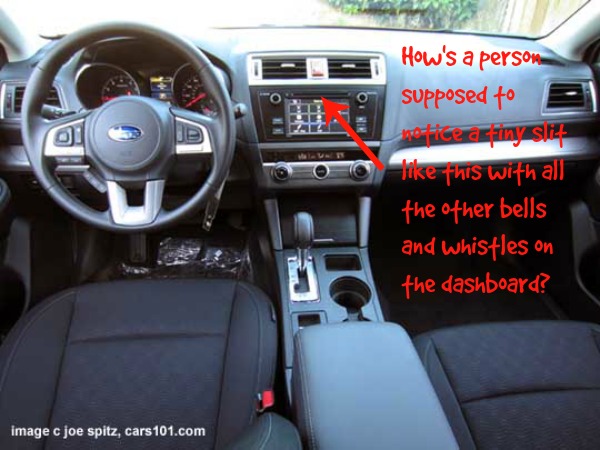
subaru legacy15-interior110. Keeping your fingers out of iPhone photos can be tricky, so it’s best to take them only when your son is available to show you what you’re doing wrong once in a while sometimes every time you aim your phone.

9.Ā  Just because there’s an iPad app people can use to sign up for your newsletter doesn’t mean the same app exists for iPhone.

8.Ā  The Word Press editorial calendar free plug in is a wonderful thing.

7.Ā  When you don’t update your business software after a major revision, the software may expire and you may not notice that it’s no longer saving your entries or password changes for almost a month, which means once you figure out what happened and get the update, you may have to spend most of a Saturday re-entering data, which would be torture were it not for Wait, Wait, Don’t Tell Me.

6.Ā  It’s possible to own a MacBook Air for 3 months before realizing a light tap on the track pad works just as well as a heavy click and is much easier on the fingers.

5.Ā  The minute you drop your land line phone, the robo-call gremlins switch to your cell phone number in a flash.

4.Ā  Two people can have their own computers, so they can stream and watch whatever they want whenever they want, and still have to take turns because they don’t have enough bandwidth to stream at the same time.

3.Ā  Always keep a cover on your cell phone or bad things can happen.

2.Ā  The windshield wiper defrost feature on the 2015 Subaru Legacy is a wonderful thing.

1.Ā  However, the Legacy’s dashboard is so filled with knobs, buttons, touch screens, bells, and whistles that 2 college graduates who are eligible for AARP but refuse to join, they may not notice the slit for loading CDs for two months and three long road trips after purchasing it.

13 Special Needs App Picks

13 Special Needs App Picks

13 Special Needs App Picks

Special needs apps keep springing up as fast as a field of daisies in summer. The field (of special needs apps, not daisies) is growing so fast, it’s hard to pick the ones best suited to meet your child’s needs.

TeachThought.com to the Rescue

Thankfully, TeachThought.com came to the rescue. Teach Thought—a website that features what’s new in educational thought, trends, technology, and other learning-related stuff—partnered with Teachers with Apps (TWA) to list their top special need apps picks.

The Special Needs App List

Here are some of the apps that made the list:

  1. See, Touch, Learn, Pro by Brain Parade is an app with many purposes, one of which is the ability to create lessons.
  2. With Pictello by Assistiveware, families can create and share talking photo albums and stories.
  3. Dragon Diction by Nuance Communication is a speech-to-text application.
  4. The Social Express by The Language Express, Inc. teaches users with high-functioning Aspergers to think about and manage social situations.
  5. My First ACC by Injini is an iPad app for younger children with delayed speech or severe speechĀ disorders.
  6. Conversation Builder Teen by Mobile Education Store is the teen version of Conversation Builder.
  7. Phonics Genius by Alligator Apps is a comprehensive phonics app.
  8. SoundLiteracy by 3D Literacy, LLC helps students recognize the spellings of English phonemes.
  9. Letter School by Boreaal gives kids many ways to practice letters and numbers.
  10. Social Quest by Smarty Ears engages older elementary, middle school and high school students in castle adventures while working on speech, language, and social skills.
  11. P.O.V.–Spatial Reasoning Skills Development by Binary Labs encourages spatial reasoning skills in kids and adults.
  12. Speech With Milo by Doonan Speech Therapy includes nine speech apps to build language skills.

More Special Needs App Information

More details about each app can be found at 13 of The Best Special Needs Apps of 2012. So zip on over and check them out. And if you have recommendations for more great apps, leave them (and a link) in the comment box.

photo credit: www.freedigitalphotos.net

Do you like what you see at DifferentDream.com? You can receive more great content by subscribing to the quarterly Different Dream newsletter and signing up for the daily RSS feed delivered to your email inbox. You can sign up for the first in the pop-up box and the second at the bottom of this page.

By

Jolene Philo is the author of several books for the caregiving community. She speaks at parenting and special needs conferences around the country. Sharing Love Abundantly With Special Needs Families: The 5 Love LanguagesĀ® for Parents Raising Children with Disabilities, which she co-authored with Dr. Gary Chapman, was released in August of 2019 and is available at local bookstores, their bookstore website, and Amazon. See Jane Dance!, the third book in the West River cozy mystery series, which features characters affected by disability, was released in October of 2023.

Author Jolene Philo

Archives

Categories

Subscribe for Updates from Jolene

Related Posts

iFeel Like an Apple iDiot

iFeel Like an Apple iDiot


The first four items on my weekend to-do list

  • Clean the bathrooms.
  • Vacuum bugs in the guest bedroom.
  • Put finishing touches on speech for next week.
  • Make apple pies for church camp scholarship auction.

were a snap to finish. In fact iWas so pleased with my skill and efficiency, my mom would have warned me not to break my arm while patting myself on the back had she been here to do so.

Then, iTackled the last two items on the list

  • Research iCloud.
  • Research iPad 3.

Two paragraphs into the first online article, iWondered if it was written in a foreign language. The article was peppered with phrases like like

iOS device,
wireless pushing,
4 GB,
retina display,
oleophobic scratch-proof glass,
slick interface,
blazing LTE hotspot.

iDidn’t understand any of them. My iCloud and iPad research made one thing perfectly clear. When it comes to technology, iFeel

iNcompetent,
iNsecure,
and
iN need of an iNterpreter.

So tomorrow, off to the Apple Store iGo where, hopefully, a perky iGenius in a bright, blue T shirt will refrain from laughter while answering my iCloud questions, respond with kindness when a blank look is my response to his answers, and exhibit great patience while conducting my iPad tutorial. iN short, iNeed an Apple Store iGenius who can do the iMpossible. iNeed an Apple Store iGenius who can make me feel

iNspired
iNstead of
iDiotic when navigating the
iUniverse.

Otherwise, iAm coming home to unwire my iUniverse and launch an apple pie baking business iNstead. Like my mother always said after she warned me about breaking my leg by patting myself on the back –

iF you can’t conquer ’em, cook ’em.